.png?width=400&height=77&name=Atlas-Metrics-Logo-Primary%20(1).png)
Yes! You can use the bulk submit feature to submit multiple network tasks simultaneously.
What are network tasks?
Network tasks are centralized data requests sent to the companies in your network. All responses are collected in one place, making it easy to track progress and manage data collection.
Once you have collected all results from your portfolio companies, you can submit the metrics via one of two ways. Either you go metric by metric and click submit on each of them, or you can submit all metrics related to a fund at the same time via the bulk submit feature.
How do I use the bulk submit feature?
- Go to your Dashboard .
- Navigate to the Network Progress Overview.
- Click the three dots next to the relevant Fund and select "Complete all network tasks."
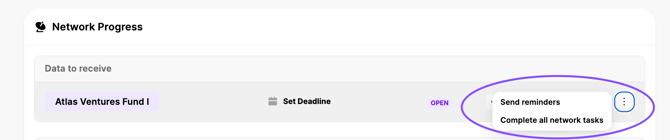
- A pop-up will appear showing the status of all network tasks for that Fund.
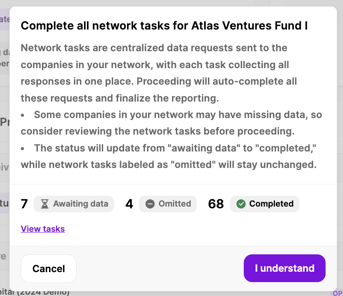
- Review the information, then click “I Understand” to submit all tasks in bulk.