![Novata_Logo_01_primary-2.png]](https://knowledge.novata.com/hs-fs/hubfs/Novata_Logo_01_primary-2.png?height=50&name=Novata_Logo_01_primary-2.png)
Data Syncing at Novata within a Report
If you have report requests from different investors, you can make use of Data Syncing to automatically copy over answers from one report to another.
Within the report, navigate to the "Report" tab > expand "Reporting Tools" > click "Sync Data".
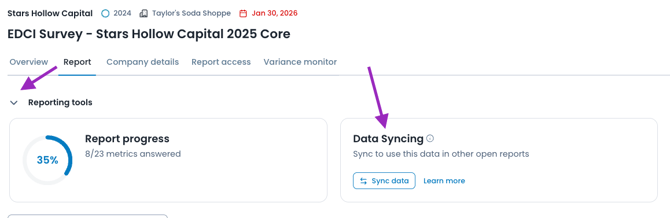
Click "Sync your reports now". On the left, any metrics that exist across your investor requests on the platform are identified. On the right, any reports to which you can push the answers are highlighted.
-1.png?width=670&height=213&name=image%20(3)-1.png)
Click "Sync Data" to copy over all selected metrics to any other selected reports, for data consistency and not duplicating efforts.
Data Syncing at Novata within Data Workspace
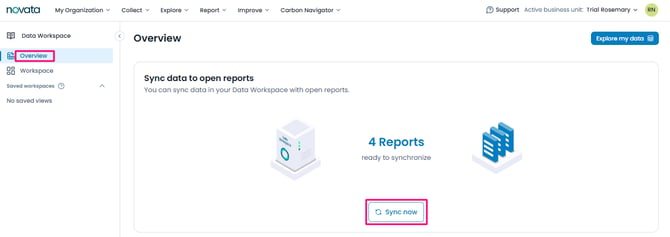
Within the top navigation bar, select Data Workspace. From the Overview tab, you will be shown the number of reports available to sync and the option to 'sync now.'
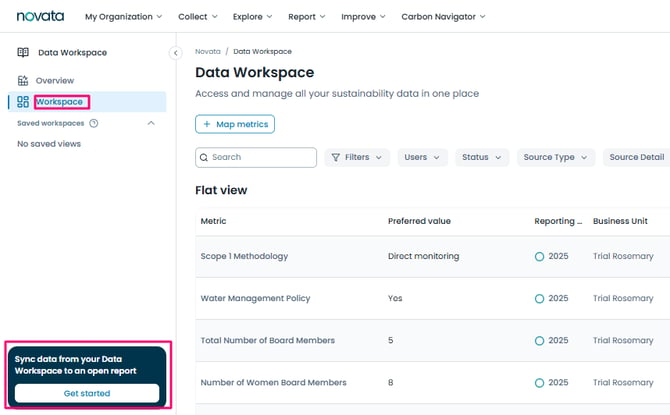
Or, from the Workspace tab, you can sync data from the prompt in the bottom left corner.
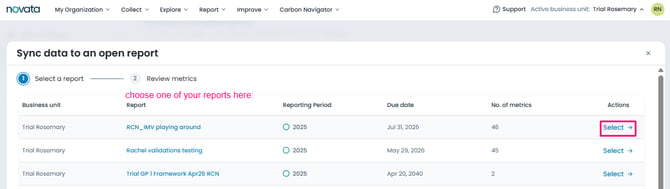
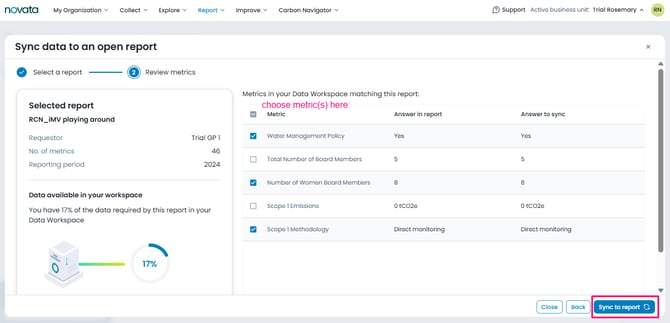
From here, you will select an open report you want to sync data into, and then select the metrics you want to push over.
Last updated: July 2026