![Novata_Logo_01_primary-2.png]](https://knowledge.novata.com/hs-fs/hubfs/Novata_Logo_01_primary-2.png?height=50&name=Novata_Logo_01_primary-2.png)
How can I build a new framework?
Creating a new framework is a very straightforward process.
- On your main dashboard, select “Frameworks” at the top, and the choose “Create Frameworks”.
- You can choose to build a framework based on our curated building blocks and calculated metrics such as the ESG Data Convergence Initiative (EDCI), Sustainable Finance Disclosure Regulation (SFDR) and Workforce Module or start from scratch and search our library of over 5,000 metrics.
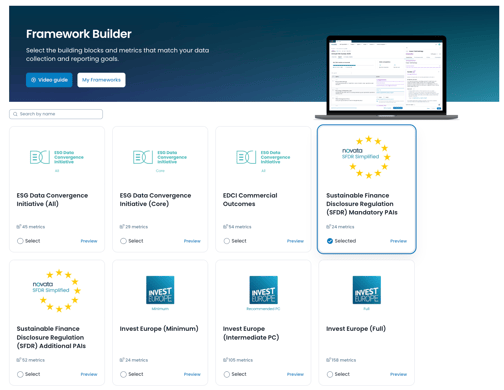
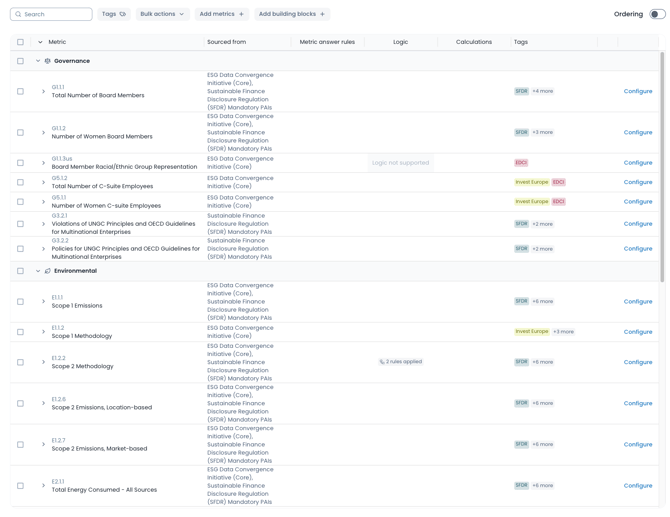
- Once you've chosen your building blocks or decided to go fully custom, you'll see the first draft of your framework in the Editing stage. From here you can add more metrics, building blocks, and configure your framework using metric rules and conditional logic.
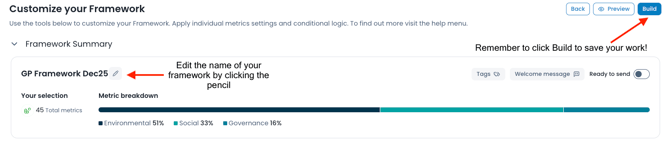
- You will be able to customize the name of your framework by clicking the pencil icon, and when you're ready to save your framework, simply click "Build" in the top right hand corner of the page.
Check out the video below for a more in depth look at the customizations available for your frameworks.
Can I make changes to a framework that has been built?
Once a framework has been created, you are able to edit it. You can change the framework name, add or remove metrics, and make any updates to the configurations. Simply go to Manage Frameworks and click Edit next to the framework you wish to edit.
To see your frameworks and make changes, select “Frameworks” on the top of your screen and then choose “Manage Frameworks”.

Once all changes have been made, make sure to click "Update" to save your changes.
What else can I do on the Manage Frameworks page?
From the Manage Frameworks page you can Create a new framework, Preview, Edit
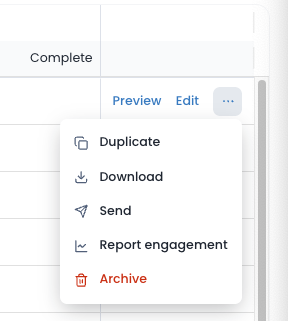
Using the three dots to the right of your framework name you will be able to choose the following:
- Duplicate the report to make edits without losing your current version
- Download an excel version to share outside of Novata
- Send the Framework as a Report
- Go to the Report Engagement tool to learn the status of your sent Reports
- Archive a framework you no longer use. Please note that archiving a framework is permanent, so use this ability with caution.
Updated: December 12, 2025