![Novata_Logo_01_primary-2.png]](https://knowledge.novata.com/hs-fs/hubfs/Novata_Logo_01_primary-2.png?height=50&name=Novata_Logo_01_primary-2.png)
How to request a new user
-
From your account, select the dropdown next to your account name in the top-right corner
-
Select “Data Provider Users”
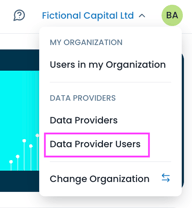
3. You will be taken to the user management page
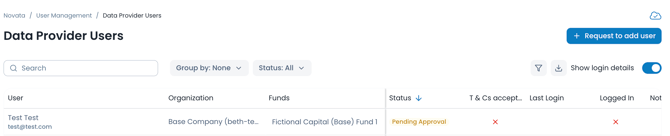
4. Select “Request to add user”

Enter the following details:
-
Organisation name
-
User’s first and last name
-
Email address
5. Select “Request” to submit the user set up request
What happens next?
-
The request is sent to admin users on the data provider’s account
-
Existing admin users will receive an email notification
-
An admin must log in to review the request
They can choose to:
-
Approve the request and add the user
-
Reject the request
Request statuses explained
-
Pending approval: The request has not yet been reviewed
-
Access denied: The request was rejected by an admin
-
Activated: The request was approved and the user has activated their account
Tracking your request
-
Navigate back to the “Data provider users” page
-
Here, you can view the status of your request
-
You can also see whether the user has activated their account and logged in
Need help?
If you need assistance requesting access for a new user:
-
Contact support@novata.com
-
Use the live chat feature