![Novata_Logo_01_primary-2.png]](https://knowledge.novata.com/hs-fs/hubfs/Novata_Logo_01_primary-2.png?height=50&name=Novata_Logo_01_primary-2.png)
Accessing Novata AI
-
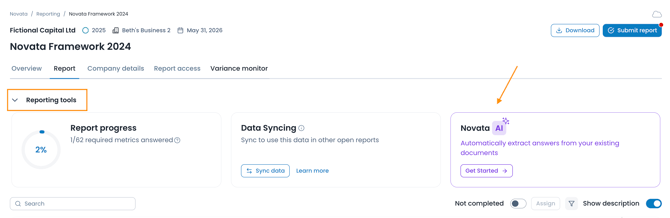
Navigate to Reporting tools within your report
-
Expand the dropdown to access Novata AI functionality
Uploading a document
-
Click 'Get Started' and upload your document(s) (e.g. your ESG strategy or internal reports)
-
You can upload up to three PDF files, with a maximum size of 10 MB
-
The system will scan the document and identify relevant information
-
Novata AI will map this information to applicable metrics in your report and generate suggested responses
-
The analysis may take a few minutes to complete, so feel free to continue working on the report in the meantime
- Only PDF documents are supported by this tool
Reviewing AI suggestions
-
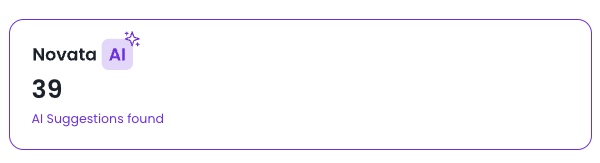
Once processing is complete, the reporting tool will tell you whether any AI suggestions have been found and, if so, how many
-
Metrics with suggested answers will display a purple “AI suggestions found” badge
-
Select “Open” on the relevant metric to review the suggestion

-
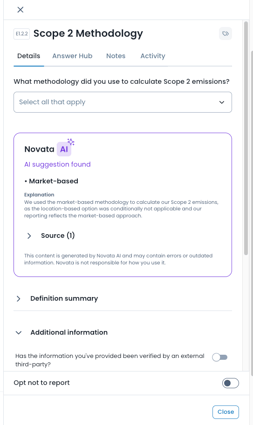
The system will show:
-
The suggested response
-
Where the information was sourced from within your document
-
Applying or rejecting suggestions
- You can choose to either apply the AI suggestion or override it with your own reponse
- AI suggestions are not automatically applied. You must review and confirm before adding them to your report
-
Novata AI is designed to assist your reporting process, but it does not replace human judgment. Therefore always make sure to review AI-generate suggestions carefully and ensure all responses are accurate and appropriate before submission
Still need help?
If you have questions about using Novata AI:
-
Contact support@novata.com
-
Use the live chat feature