.png?width=400&height=77&name=Atlas-Metrics-Logo-Primary%20(1).png)
How does the European Investment Fund request data?
For the 2024 reporting cycle, most European investors have agreed to align around a common data structure and a standardized set of requested information for ESG and portfolio reporting. Invest Europe, in collaboration with many partners, has developed a new standardized Excel template (The template can be found here). The European Investment Fund has adopted this template for their reporting needs. This means you can use the Invest Europe Template to report your data directly to the European Investment Fund.
More about the Invest Europe export can be found in our FAQ
How can I export the template?
Before you export any data, make sure that all your metrics have been submitted (review how to bulk submit metrics here).
You can find the export directly in your account:
- Go to the All metrics tab.
- In the top right, click Export.
- In the "Export Standard" dropdown, select Official Invest Europe Template
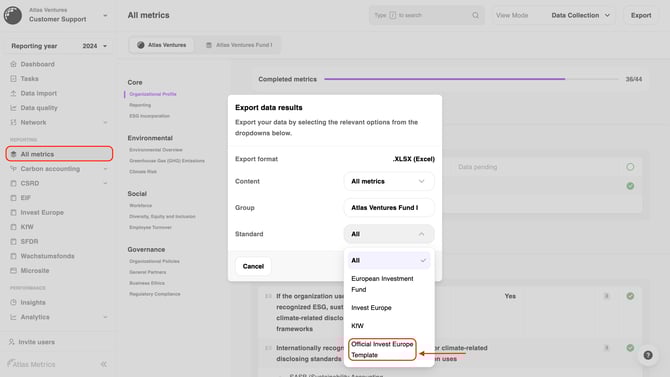
- Click on Export
- Confirm, that all your metrics have been submitted
- Warning: Only metrics that have been submitted will be included in the export (review how to bulk submit metrics here).
- The export will automatically download.
Make sure to submit all tasks in your account before exporting, so that all relevant information is included in the export. You can use the bulk submit feature to quickly submit multiple tasks at once.
Reporting details to consider for the European Investment Fund
You can use the Invest Europe Template as a basis for your reporting to EIF.
Reminder: Please make sure to review the specific reporting requirements communicated to you by the European Investment Fund before sharing your export.
Should you have any uncertainty, you are welcome to reach out to the relevant EIF contact via esgreporting@eif.org.