.png?width=400&height=77&name=Atlas-Metrics-Logo-Primary%20(1).png)
⚠️ Please be aware that the deadline for completing your Quality Assurance data review for the 2025 reporting cycle is Friday, the 15th of May. ⚠️
What is the Data Quality Tool?
The Data Quality Tool is a feature in your Atlas Metrics account that helps you review and optimize your submitted ESG data to ensure your data is as accurate, consistent, and reliable as possible — before it's finalized for reporting.
The tool automatically scans for common issues across your GP, fund, and portfolio company data. It flags missing values, identifies outliers beyond certain thresholds or standard deviations, and surfaces potential inconsistencies for you to review and correct or follow-up on as necessary.
Where can I find the tool?
You can access the tool by:
- Logging into your Atlas Metrics account.
- Navigating to the "Data Quality Tool" section on the main dashboard.
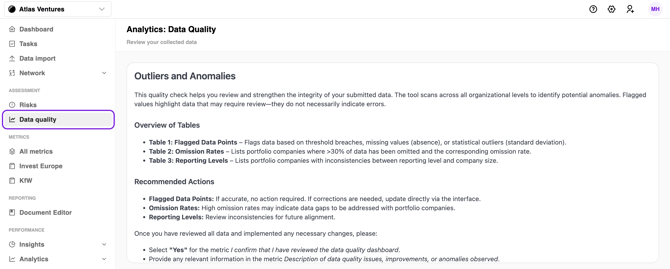
The tool consists of three QA tables: Flagged Data Points (Table 1), Absence Rates (Table 2), and Reporting Levels (Table 3). At the top of the page, you'll find an explanation of each table and how to interpret the items the tool has identified.
What steps do I need to take?
To complete the data quality review, you will need to take the following steps outlined below for each QA table.
If no items are displayed in any of the three tables then your data points have passed all of the data quality review and you can move directly to step 4.
1. Assess flagged data points in Table 1 and correct as necessary.
This Table shows data points that may be missing critical information, are passing a threshold set by KfW, or appear as outliers.
Review each data point flagged by the QA tool and determine whether it needs to be corrected or is accurate as submitted.
-
- If the result being flagged relates to one of your GP or fund-level metrics (identified using column “metric type”), please click the “Open task” linked on the right of the table. This will take you to the metric, where you should directly update and submit your corrected result.
- If a flagged result relates to a portfolio company data point (shown as "portco_disclosure_inbound" in the metric type column), reach out to them directly outside the platform to confirm whether the data is correct or needs updating. For results that need to be updated
- You can either instruct your portfolio companies to update the metrics on their account and re-share the metrics with you, or
- Update the result directly in your GP account by clicking "Open task" on the right of the table and entering the correct value via the alternative values feature. This allows you to provide data on behalf of your portfolio companies, overriding what was originally submitted. Once updated, re-submit the metric.
Please provide contextual information of your review on flagged data points, especially for metrics that have been flagged but are correct and submit this information via the QA metrics as outlined in step 4.
2. Review and address your portfolio companies’ absence rates in Table 2.
This table lists portfolio companies where more than 30% of data is incomplete. Reach out to understand why data is missing and encourage further submissions before the QA deadline if possible. If the deadline cannot be met, use this as an opportunity to help your portfolio companies identify areas to strengthen their data collection ahead of the next cycle.
3. Review portfolio companies with underclassified reporting levels in Table 3 to ensure they are correctly classified for the next reporting cycle.
Review the FTE figures for each portfolio company in the results column of Table 3, comparing them against their assigned reporting level and corresponding FTE size range.
If a company's FTE count exceeds the threshold specified by its reporting level, ensure the portfolio company is correctly reclassified for the next reporting cycle and, if necessary, discuss support for ESG data collection at the higher reporting level.
4. Complete the two additional QA related metrics on you account and share with KfW.
Complete the two additional metrics that have been activated on your account in your Network > Send Data page.
- The first metric confirms your review and completion of the data quality review phase.
- The second metric is an open text field where you can add clarifications or context on your data quality review. In particular, please provide information for flagged results in Table 1 where no updates were made.
5. Submit and share the two additional metrics to KfW Capital via the Network page to complete the QA phase.
How do I confirm I have completed the review?
Once you’ve addressed all data quality issues:
- Navigate to Network → Send data.
- Share the two additional metrics with KfW Capital.
I have questions, what do I do?
If you are uncertain about why a data point is being flagged, you can reach out to:
- KfW directly via Sustainability-KfW-Capital@kfw.de
- The Atlas support team via support@atlasmetrics.io